Seagate's FireCuda Forge Pairs a 20TB Hard Drive With Your Own NVMe SSD
Seagate's FireCuda Forge combines a mechanical drive with a user-supplied NVMe SSD. Here's how its caching works and what the extra cost buys you.
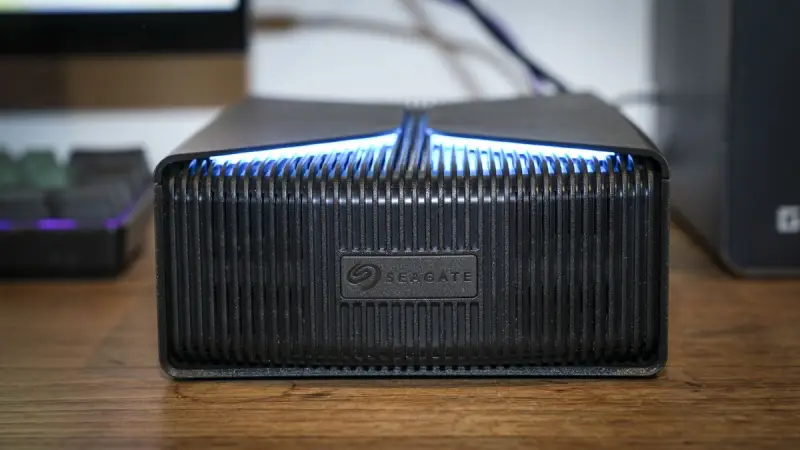
Seagate's FireCuda Forge is an external drive that makes a hard disk behave, for some workloads, like it has a fast SSD inside. The catch is that the SSD isn't in the box. You buy an M.2 NVMe drive yourself, slot it in, and the Alkemi platform handles the rest. That split makes the product more interesting than a standard high-capacity enclosure, and it also makes the total price harder to judge at a glance.

What's actually new here
Hybrid drives aren't a new idea. In the mid-2000s, manufacturers put small amounts of flash memory alongside a spinning platter and tried to use the flash to hold frequently used data. Seagate's Momentus 5400 PSD, released in 2007, was one of those attempts. The concept was simple: keep the cheap capacity of magnetic storage, and use flash to shorten the wait for the files you touch most.
Those early designs were constrained by their flash. The cache was small, often bundled inside a laptop drive, and the software deciding what lived in flash was fairly blunt. The benefit was real for a handful of workloads, such as boot files and frequently launched applications, but it rarely changed how a whole system felt.
The FireCuda Forge takes the same principle and moves it outside the machine, into an external enclosure with a dedicated M.2 slot. The bigger difference is the controller logic. Alkemi watches file activity, decides which data earns space on the faster NVMe drive, and moves it as usage patterns shift. Both devices show up to the operating system as a single volume, so you don't manage two drives by hand.
That's the design goal. My read is that the more important question is how well the placement decisions match real workloads, and Seagate's materials don't give enough detail to judge that yet.
How the caching model should be understood
It helps to be precise about what this arrangement does. The HDD doesn't turn into flash. Its platters still hold the bulk of the data, and the NVMe drive acts as a fast tier for whatever Alkemi considers hot. When a file on the fast tier is read, the response comes at SSD speed. When a file lives only on the mechanical disk, you get HDD behavior, with seek times and sequential throughput determined by the platter.
That distinction matters most for latency-sensitive access. Large sequential transfers, like copying a long video file, are where spinning disks already perform reasonably well. Random reads, such as loading thousands of small assets in a game or opening a project with many scattered files, are where the mechanical disk suffers and where a flash tier can help the most.
Teams evaluating tiered storage typically look at three things: how quickly the cache warms up after a change in workload, what happens when the working set is larger than the fast tier, and how the system handles writes. Caching reads is straightforward. Caching writes means data has to be safely committed somewhere, and how that's handled determines whether a sudden power loss or disconnect can leave a file in an inconsistent state. The source material doesn't spell out the write policy, so that's a question to put to Seagate before relying on the device for critical work.
The performance numbers and the connection limit
Seagate advertises sequential read speeds of up to 2,500MB/s and write speeds reaching 2,000MB/s. Connectivity is USB4, and supported systems include Windows 11 and macOS 26 or later.
Those figures need context. USB4 has a theoretical ceiling of 40Gbps, which works out to roughly 5GB/s before protocol overhead, so the advertised numbers are comfortably within what the interface can carry. What the figures don't tell you is how they hold up under mixed workloads, sustained writes, or a cache that's partly cold. Peak sequential numbers are a useful ceiling, but the experience of a tiered drive lives in the misses, not the peaks.
The NVMe drive's own speed also sets the ceiling for the fast tier. A cheaper, slower M.2 SSD will narrow the gap between this product and a standard external SSD, while a faster drive will push the fast tier closer to what the enclosure can deliver. That makes the choice of SSD a meaningful part of the purchase rather than a footnote.
The real cost of the setup
The FireCuda Forge is sold in two capacities. The 8TB model is listed at $699, and the 20TB version at $899, through Seagate's online store and authorized retailers. Both configurations use upgradeable mechanical storage, so you can swap in a larger hard drive later if your library grows.
The sticker price doesn't include the NVMe SSD, and that's the part that changes the math. Seagate doesn't supply the drive, so buyers have to add one, and the source material points to about 1TB as the practical size. Our review found the drive can't be accessed until the SSD is installed, which means the SSD isn't an optional upgrade. It's required hardware.
Compared with a conventional external HDD of similar capacity, the FireCuda Forge costs more and asks you to budget separately. You're paying for automated tiering, the enclosure's performance profile, and the convenience of one volume. Whether that premium makes sense depends on how much of your work is bottlenecked by random access. If your bottleneck is capacity, a plain high-capacity drive will be cheaper per terabyte. If your bottleneck is waiting on a library to load, the premium may be easier to justify.
Who this is for, and what to watch
Seagate points to two groups: gamers managing extensive libraries and creators working on demanding media projects. Both fit the pattern where a large set of files is accessed unevenly, with a smaller set doing most of the work. That's the kind of workload where tiering can pay off.
Lance Ohara, VP of Edge IoT Marketing at Seagate, framed the product this way: "For years, external storage has forced users to choose: speed or scale. Forge is built on the idea that they shouldn't have to." The pitch is clear. Whether the placement logic delivers consistent results across varied projects is the open question.
Three things are worth testing before committing to a setup. First, how quickly the cache adapts when you switch between projects or games. Second, what the drive does when your active set exceeds the SSD's capacity. Third, how the write path behaves under sustained loads. Answers to those questions will say more about the FireCuda Forge than any headline speed figure. And if the tiering works as described, it could push other external storage makers toward the same split between capacity and responsiveness.